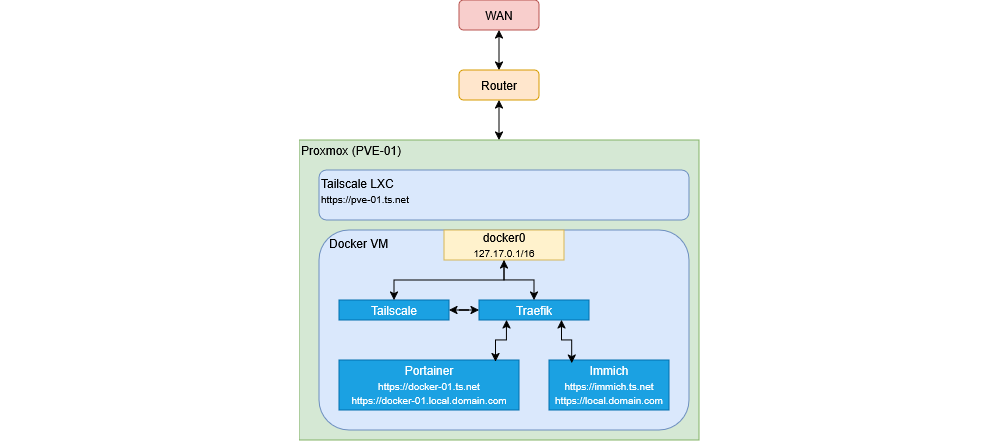
Introduction
Since humble beginnigs in 2012 when I built my first NAS, I have always managed a personal homelab. One of the biggest challenges
I always struggled with was accessing it remotely in a secure way. Originally I would port forwards services. Then over the past
couple of years I used tailscale to expose my internal subnet using pfSense. However, this introduced a single point of failure
and was a pain to manage on the DNS side.
With all this in mind, I have gone ahead and installed tailscale on every machine I wished to access both locally and remoetly.
I have also decided to leverage Tailscale Services to do all my routing,
DNS and certificate management. I’ll be using my local Proxmox server and some of its containers to step through my setup.
Access Controls
The new tailscale services feature requires you to assign tags to any tailscale devices you wish to serve servies on. Considering
my example has a proxmox server (using an unprivilaged Tailscale in LXC containers)
and a docker VM using traefik, here’s how I have configured my ACLs:
{
       ...
    "tagOwners": {
        "tag:pve-01":              ["autogroup:admin"],
        "tag:docker-01":           ["autogroup:admin"],
	},

        ...
    "autoApprovers": {
		"services": {
            "svc:pve-01":     ["tag:pve-01"],
            "svc:docker-01":  ["tag:docker-01"],
            "svc:traefik-01": ["tag:docker-01"],
            "svc:immich":     ["tag:docker-01"],
		},
	},
       ...
autoApproves will play an important role later on when spinning up our tailscale container.
Define Services
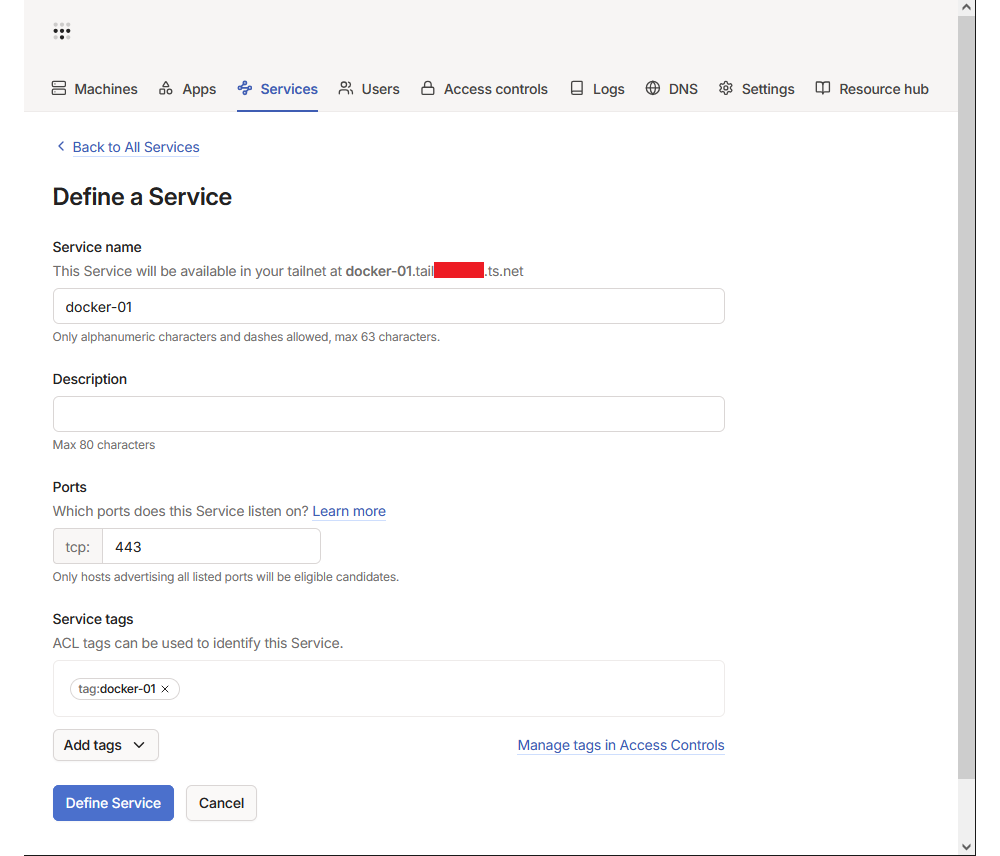
Within the tailscale dashboard, under the Services tab, go ahead and define the same services we added to our autoApprovers list.
Set Ports to 443 and make sure you match the Service tags to what was defined in your autoApprovers.
Setting Up Traefik
I will not go much into detail here as Techno Tim already has a great video
tutorial on this. For simplicity you could even keep everything HTTP within your traefik proxy network, since tailscale will take care of
HTTPS outside if this docker network. In my case, I want to use my own domain + HTTPS as a fallback. Here is my docker-compose:
services:
  traefik:
    image: traefik:v3.0
    container_name: traefik
    restart: unless-stopped
    security_opt:
      - no-new-privileges:true
    networks:
      - proxy
    ports:
      - 80:80
      - 443:443
    environment:
      CF_DNS_API_TOKEN_FILE: /run/secrets/cf_api_token # note using _FILE for docker secrets
      TRAEFIK_DASHBOARD_CREDENTIALS: ${TRAEFIK_DASHBOARD_CREDENTIALS}
    secrets:
      - cf_api_token
    env_file: .env
    volumes:
      - /etc/localtime:/etc/localtime:ro
      - /var/run/docker.sock:/var/run/docker.sock:ro
      - ./data/traefik.yml:/traefik.yml:ro
      - ./data/acme.json:/acme.json
      - ./data/config.yml:/config.yml:ro
    labels:
      - "traefik.enable=true"
      - "traefik.http.routers.traefik.entrypoints=http"
      - "traefik.http.routers.traefik.rule=Host(`traefik.local.bottazzi.ca`) || Host(`traefik-01.<YOUR_TAILNET>.ts.net`)"
      - "traefik.http.middlewares.traefik-auth.basicauth.users=${TRAEFIK_DASHBOARD_CREDENTIALS}"
      - "traefik.http.middlewares.traefik-https-redirect.redirectscheme.scheme=https"
      - "traefik.http.middlewares.sslheader.headers.customrequestheaders.X-Forwarded-Proto=https"
      - "traefik.http.routers.traefik.middlewares=traefik-https-redirect"
      - "traefik.http.routers.traefik-secure.entrypoints=https"
      - "traefik.http.routers.traefik-secure.rule=Host(`traefik.local.bottazzi.ca`) || Host(`traefik-01.<YOUR_TAILNET>.ts.net`)"
      - "traefik.http.routers.traefik-secure.middlewares=traefik-auth"
      - "traefik.http.routers.traefik-secure.tls=true"
      - "traefik.http.routers.traefik-secure.tls.certresolver=cloudflare"
      - "traefik.http.routers.traefik-secure.tls.domains[0].main=local.bottazzi.ca"
      - "traefik.http.routers.traefik-secure.tls.domains[0].sans=*.local.bottazzi.ca"
      - "traefik.http.routers.traefik-secure.service=api@internal"


secrets:
  cf_api_token:
    file: ./cf_api_token.txt

networks:
  proxy:
    external: true
Setting up Tailscale
I have gone ahead and created an entirely separate docker-compose.yaml for tailscale. However, it might be a little cleaner
to combine it with my Traefik compose. You can even go the extra mile and isolate tailscale from the proxy network and only
allow it to communicate with traefik.
Compose
services:
  tailscale:
    image: tailscale/tailscale:latest
    container_name: tailscale
    hostname: docker-01-ingress
    restart: unless-stopped
    entrypoint: /bin/sh /entrypoint.sh
    cap_add:
      - NET_ADMIN
      - SYS_MODULE
    env_file: "stack.env"
    volumes:
      - ./tailscale/config:/var/lib/tailscale
      - ./tailscale/serve-config:/serve-config:r
      - /home/eric/tailscale/entrypoint.sh:/entrypoint.sh:r
      - /dev/net/tun:/dev/net/tun
    networks:
      - proxy
    ports:
      - "41641:41641/udp"  # Tailscale UDP port

networks:
  proxy:
    external: true
Note: The custom entrypoint.sh was the only way I could get tailscale to automatically advertise my services on startup.
Environment Variables
Everything in my stack.env file.
| Variable |
Value |
| TS_AUTHKEY |
tskey-auth-xxxx |
| TS_STATE_DIR |
/var/lib/tailscale |
| TS_USERSPACE |
false |
| TS_EXTRA_ARGS |
–advertise-tags=tag:docker-01 |
| TS_SERVE_CONFIG |
/serve-config/serve.json |
Note: When generating your auth key be sure to enable Reusable, Ephemeral and assign the proper tags (docker-01 in my case).
Entrypoint Script
#!/bin/sh

# 1. Start the standard bootloader in the background
# It will use your TS_AUTHKEY, TS_STATE_DIR, TS_USERSPACE, and TS_EXTRA_ARGS
/usr/local/bin/containerboot &

# 2. Wait for connectivity
echo "Waiting for Tailscale to be ready..."
until tailscale status > /dev/null 2>&1; do
  sleep 2
done

# 3. Extract service names starting with 'svc:' from the JSON and advertise them
SERVICES=$(grep -o 'svc:[^"]*' /serve-config/serve.json)

for svc in $SERVICES; do
  echo "Advertising $svc..."
  tailscale serve advertise "$svc"
done

# 4. Keep the container running
wait
Adding Your Services to the Service Config
The simpliest way I have found to do this is by calling tailscale serve directly in the tailscale docker and dumping the json config.
Here’s how I did it for my 3 services:
Defining Services
docker exec tailscale tailscale serve --https=443 --service=svc:traefik-01 https+insecure://traefik:443
docker exec tailscale tailscale serve --https=443 --service=svc:docker-01 https+insecure://traefik:443
docker exec tailscale tailscale serve --https=443 --service=svc:immich https+insecure://traefik:443
Dumping the Config
docker exec tailscale tailscale serve status --json > ./tailscale/serve-config/serve.json
Conclusion
With both of these docker composes spun up, you should be able to access https://traefik.<YOUR_TAILNET>.ts.net.
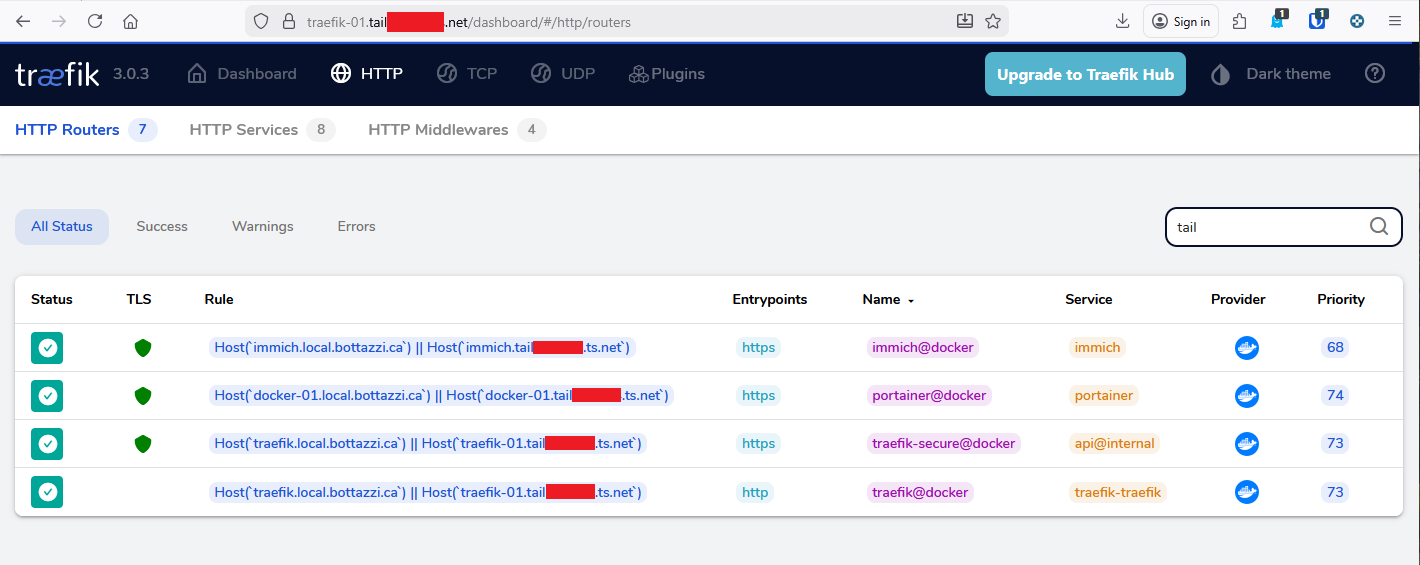
You will need to add your tailscale domain names to each of your containers (such as portainer and immich), see appendix for examples.
Adding future containers to your stack will require you to repeat the following steps: Update Tailscale ACLs, define a service, update
your serve.json and assign the proper labels to your target container.
Toubleshooting
If you are having troubles routing, check your tailscale logs by running docker compose logs tailscale -f.
Appendix
Example Immich Labels
    labels:
      - "traefik.enable=true"
      - "traefik.docker.network=proxy"
      - "traefik.http.routers.immich.rule=Host(`immich.local.bottazzi.ca`) || Host(`immich.<YOUR_TAILNET>.ts.net`)"
      - "traefik.http.routers.immich.entrypoints=https"
      - "traefik.http.routers.immich.tls=true"
      - "traefik.http.services.immich.loadbalancer.server.port=2283"
      - "traefik.http.services.immich.loadbalancer.server.scheme=http"
Example Portainer Labels
    labels:
      - "traefik.enable=true"
      - "traefik.http.routers.portainer.rule=Host(`docker-01.local.bottazzi.ca`) || Host(`docker-01.<YOUR_TAILNET>.ts.net`)"
      - "traefik.http.routers.portainer.entrypoints=https"
      - "traefik.http.routers.portainer.tls=true"
      - "traefik.http.services.portainer.loadbalancer.server.port=9000"